SQL Server Reporting Services
With the aid of SQL Server Reporting Services, you can easily design, implement, and manage reports for your business. You can also leverage programming features to enhance and personalize your reporting capability.
Let's find out exactly what SSRS is! Microsoft's response to business reporting is SSRS. It includes APIs that enable developers to integrate or extend data and report processing in custom applications as well as a comprehensive set of tools for creating, managing, and delivering reports. It now includes intuitive substances in web-based reports in addition to conventional paper reports. The web-based Hypertext Mark-up Language (HTML) and work area application (Microsoft Excel and CSV) designs can be used to create reports with SSRS, allowing clients to control their data in any configuration they choose.
Additionally, reports can be easily introduced in corporate entrances by using SharePoint as a front end for SSRS. The Microsoft Business Intelligence (BI) platform, which includes SSRS as one of its components, is an excellent platform for large businesses' data analysis.
From relational, multidimensional, or XML-based data sources, you can create interactive, tabular, graphical, or free-form reports with Reporting Services. Reports can be accessed whenever you want, scheduled for processing, or published. You can also interactively explore data within the model and create ad hoc reports based on predefined models with Reporting Services. You can subscribe to published reports, export reports to other applications, and choose from a variety of viewing formats. Using a Web connection, a Microsoft Windows application, or a SharePoint site, you can view the reports you create. The key to your company's data is provided by Reporting Services.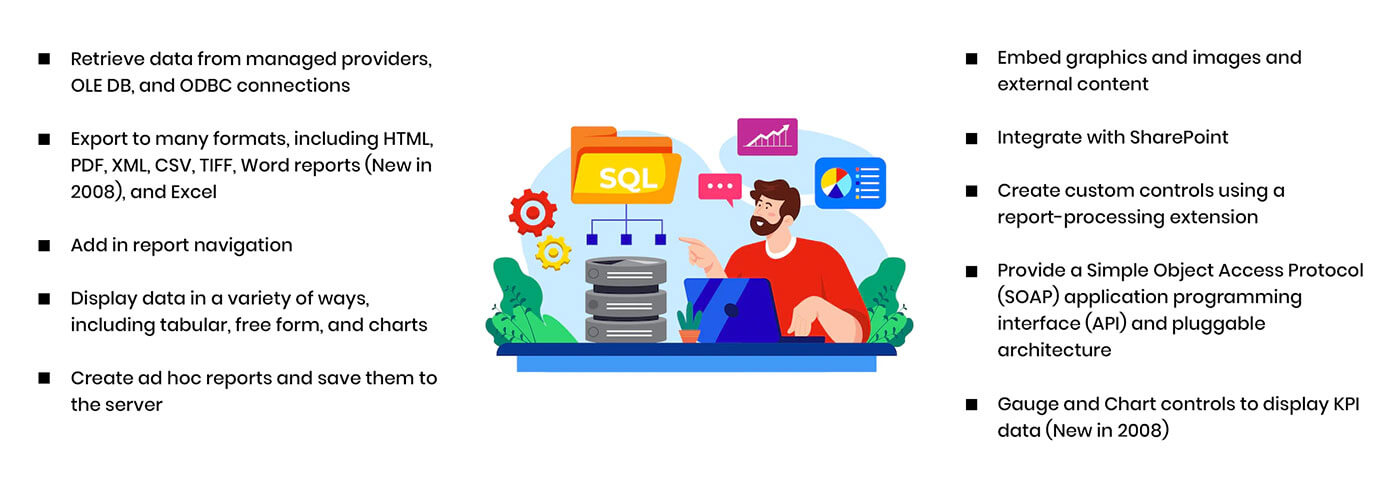
Let's find out exactly what SSRS is! Microsoft's response to business reporting is SSRS. It includes APIs that enable developers to integrate or extend data and report processing in custom applications as well as a comprehensive set of tools for creating, managing, and delivering reports. It now includes intuitive substances in web-based reports in addition to conventional paper reports. The web-based Hypertext Mark-up Language (HTML) and work area application (Microsoft Excel and CSV) designs can be used to create reports with SSRS, allowing clients to control their data in any configuration they choose.
Additionally, reports can be easily introduced in corporate entrances by using SharePoint as a front end for SSRS. The Microsoft Business Intelligence (BI) platform, which includes SSRS as one of its components, is an excellent platform for large businesses' data analysis.
From relational, multidimensional, or XML-based data sources, you can create interactive, tabular, graphical, or free-form reports with Reporting Services. Reports can be accessed whenever you want, scheduled for processing, or published. You can also interactively explore data within the model and create ad hoc reports based on predefined models with Reporting Services. You can subscribe to published reports, export reports to other applications, and choose from a variety of viewing formats. Using a Web connection, a Microsoft Windows application, or a SharePoint site, you can view the reports you create. The key to your company's data is provided by Reporting Services.
Skills Matrix
Our finished reports can be viewed by users in their web- or Windows-based applications or from the Report Manager section of the Reporting Services website. Reports can be run on demand or scheduled as subscriptions by end users. We can also install SSRS to allow SharePoint to run the reports.
SQL Server Reporting Services Development Tools
The SSRS development tool was Business Intelligence Development Studio (BIDS) in early versions of SQL Server. However, you will use SQL Server Data Tools – Business Intelligence (SSDT-BI) beginning with SQL Server 2012, which may or may not be included in the SQL Server media depending on the version. Visual Studio acts as an add-in for each tool. The BIDS or SSDT-BI installation will install a Visual Studio shell if you do not already have it installed.
- BIDS -SQL Server installation media
- SSDT-BI and VS 2010-SQL